HTTP Header FTS
All HTTP headers including requests (GET, POST,..etc) and responses (HTTP OK, errors ) are stored in the FTS index.
What is Stored ?
Trisul stores the entire HTTP request or response header as a single document, with every field indexed. You can generate reports by User-Agent, Server, Content-Type or any other field in the HTTP header.
The following extra attributes are added by Trisul to aid some kinds of useful queries
- CODE - HTTP response code
- URI - The full URL
Sample Document
A typical document looks like this
    POST /ajax/ufi/like.php HTTP/1.1
    Host: www.facebook.com
    User-Agent: Mozilla/5.0 (X11; Ubuntu; Linux i686; rv:11.0) Gecko/20100101 Firefox/11.0
    Accept: text/html,application/xhtml+xml,application/xml;q=0.9,*/*;q=0.8
    Accept-Language: en-us,en;q=0.5
    Accept-Encoding: gzip, deflate
    Connection: keep-alive
    X-SVN-Rev: 810660
    Content-Type: application/x-www-form-urlencoded; charset=UTF-8
    Referer: http://www.facebook.com/
    Content-Length: 368
Using
👉 Go to Resources → HTTP Header FTS
Follow the instructions in Full Text Search.
Special Tips for HTTP Header FTS
Special Attributes
You should leverage the special attributes URI and CODE to narrow down your search.
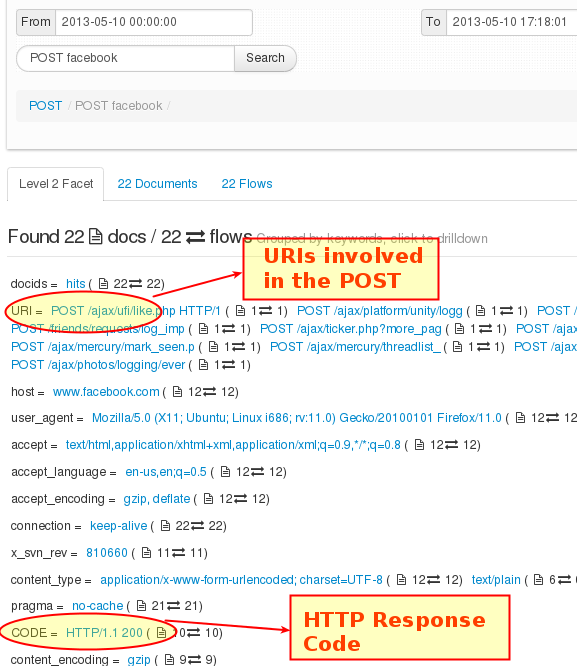
Figure: Showing URI and CODE attributes
Documents to Flows
Once you have sufficiently narrowed down your documents of interest.
- Switch to Flows
- Use the Options dropdown menu and the URLs in flow to switch to the URL normal index page.
- Use the Download PCAP button at the top to download all the flows shown at once
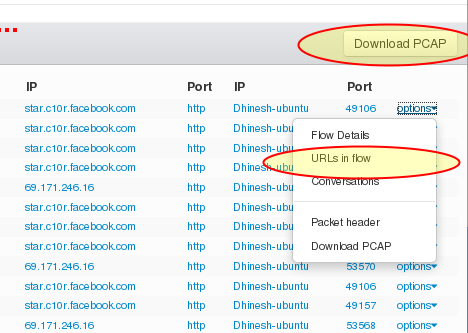
Figure: Click on options to bring up pivoting options to other kinds of data