Trisul ISP Analytics Guide
Trisul ISP Analytics adds peering, prefix, AS path and country analytics to flow-based monitoring. It combines NetFlow from your gateway routers with the BGP routes that Trisul collects as a passive I-BGP peer.
Trisul ISP Analytics adds the following:
- Peering Analytics
- Prefixes IPv4 and IPv6
- AS analytics
- Mapping ASN, Prefixes, Geo location to gateway routers and interfaces
- Private Peering analytics with content providers
- Route analytics
- Custom metering of downstream customers usage patterns
Network integration diagram
The following diagram is an overview of integration points (some are optional) for a NetFlow-based Trisul ISP Analytics deployment.
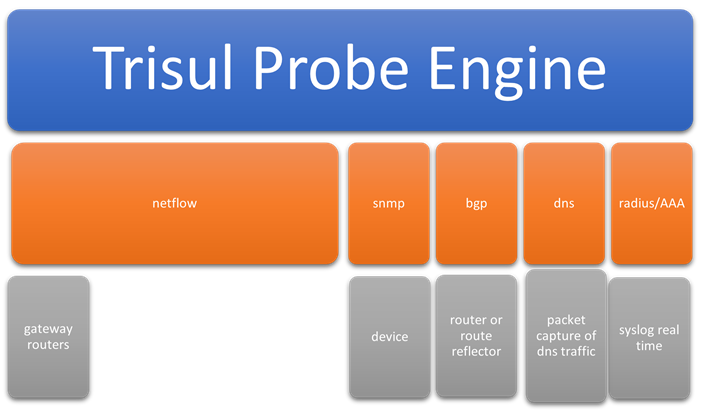
Network Integration Diagram
Trisul ISP Analytics ingests the following data sources. Only NetFlow is required.
| Data source | Notes |
|---|---|
| NetFlow | Required. All versions of NetFlow, JFlow, IPFIX, sFlow and NetStream are supported. Follow ISP NetFlow best practices, such as sampling and ingress policies. |
| SNMP | Optional: for SNMP interface traffic. Useful to add on dashboards along with NetFlow interface traffic. |
| BGP | Optional: if customer requires Route Analytics and Peer vs Origin AS |
| DNS | Optional: needed for the OTT Analytics app, to identify content such as Amazon, Netflix, YouTube, WhatsApp and Instagram. |
Features of Trisul ISP Analytics
In addition to the NetFlow monitoring features, Trisul ISP Analytics provides the following.
| Feature | Description |
|---|---|
| AS Analytics | Autonomous system traffic monitoring. AS to AS traffic matrix, AS drilldown. Flexible AS monitoring at global level, per router and per interface. Peer AS monitoring. Use case: an ISP can track AS traffic flows at minute level. |
| Prefix Analytics | Prefixes are important for traffic engineering purposes. Like AS analytics, Prefix analytics is also available at global level, per router, and per interface |
| Routing | Trisul includes a built-in BGP route receiver that can peer with dozens of gateways. AS Path analytics shows the busiest paths and segments for upstream and downstream customers, globally (the busiest route in the ISP network), per router and per interface. Peer AS and Origin AS are tracked separately. |
| Country | Main use case is to see traffic egressing country on optimal traffic route east or west coast depending on final destination. Per Country in/out traffic is provided again at global level, per router, and per interface granularity. |
| Drilldowns | The above mentioned AS,Prefix,Country analytics can also be done in a drilldown method. Rather than starting with a router/interface you can start with a AS Number and see where the traffic is coming from for that AS |
| Device Monitoring | Use the Routers and Interfaces tool to track any router and interface and drill down to usage. |
BGP and NetFlow
Selecting ISP Analytics Suite in the product mode selector sets the product mode and the ISP menus. It doesn't configure anything else. You set up BGP and install the ISP apps and dashboards yourself, using the pages below. The trackers in the NetFlow Analyzer guide are for enterprise networks; ISP deployments don't need them.

- To configure BGP, see Configuring BGP.
- To install the apps and dashboards for ISP analytics, see ISP Apps and Dashboards.
Pages in this guide
📄️ System Requirements
This page lists the system requirements for Trisul ISP Analytics.
📄️ Configuring BGP
This section describes how to configure BGP in Trisul ISP.
📄️ ISP Apps and Dashboards
After you configure BGP, install the Trisul apps that provide the Trisul ISP Analytics dashboards.
📄️ ISP Analytics Dashboard
This page describes the dashboards that the ISP apps add. For an overview of what Trisul ISP Analytics provides, see the Trisul ISP Analytics Guide.
📄️ Resource Groups for Subscribers
Resource groups assign devices, interfaces and other objects to users. A subscriber user sees only the resources in the groups assigned to them, in the Traffic Grapher.
📄️ PING Monitor
PING Monitor allows ISP to monitor a select number of devices for the following
📄️ Traffic Grapher
The Traffic Grapher shows a subscriber user the bandwidth of the resources assigned to them, similar to MRTG.
📄️ OTT Analytics
Some ISP need visibility into OTT (Over the Top) media platforms such as
📄️ Tenant API
The Tenant API lets you create tenant mappings, manage the IP addresses and link attributes of a tenant, restart a tenant and check its status. For the Tenants screen in the UI, see Manage Contexts - Tenants.
📄️ User API
Overview