Admin Tasks
Admin Tasks is the menu where administrators start and stop Trisul, manage profiles, and check probe health, storage and licensing. It also holds user resources, the BGP route receiver, NetFlow templates and disaster-recovery status.
Admin Tasks Menus
navigation
Go to Context: default → Admin Tasks, then select a menu from the table below.
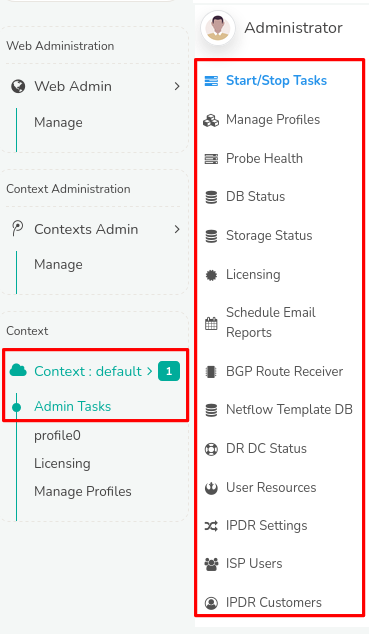
Figure: Admin Tasks
Explore the documentation to access detailed information and controls for admin tasks, organized into the following functional menus.
| Menu | Description |
|---|---|
| Start/Stop Tasks | Enables starting and stopping Hub and Probe nodes associated with each context directly through the Web Interface. |
| Manage Profiles | Provides a list of available profiles used by multiple probes to manage. |
| Probe Health | Shows the reachability, current traffic, and latency of Trisul Probes in this particular context. |
| DB Status | Displays Trisul Data Base Statistics, showing storage volumes and usage across Oper, Reference, and Archive segments, facilitating storage planning and configuration. |
| Storage Status | Check availability of disk space, storage devices, and file systems. |
| Licensing | See Licensing |
| Schedule Email Reports | See Schedule Email Reports |
| BGP Route Receiver | See BGP Route Receiver |
| NetFlow Template DB | Provides NetFlow/IPFIX template database received by all probes. |
| Audit Log | Search and download the record of logins, administrative actions and configuration changes. |
| DR DC Status | Check configuration of Disaster Recovery when the Primary Site crashes. |
| User Resources | Assign network devices, interfaces, IP addresses, IP subnets or any other network entity to Users. |
| IPDR Settings | See IPDR Settings |
| IPDR Customers | See Set IPDR Mode |