Reducing False Positive Alerts
Trisul interfaces with IDS over Unix sockets / EVE JSON, so any signature that fires too often in IDS surfaces directly as IDS alert noise inside Trisul. One of the most effective ways to cut down false positives from this alert class is to suppress the specific signature at the IDS layer, rather than trying to filter it out after the fact in Trisul.
A false positive is an alert raised for traffic that is actually legitimate the detection engine flags it as suspicious or malicious, but there is no real threat. False positives typically come from signatures that are too broad, or from legitimate but unusual traffic patterns internal vulnerability scanners, health checks, backup jobs, or custom applications that happen to match a signature's pattern. Left unaddressed, they add noise that makes it harder to spot genuine alerts.
This page walks through identifying a noisy signature and disabling it cleanly.
1. Identify the noisy signature
In the Trisul UI, open Alerts > IDS Alerts and sort/filter by signature message
(msg) or signature ID (sid) over a representative time window (a week is usually
enough to spot chronic offenders). Look for:
- A single
sidresponsible for a disproportionate share of alerts. - Alerts consistently tied to known-good hosts, internal scanners, monitoring tools, or expected application behavior (e.g. health checks, internal vulnerability scanners, backup agents).
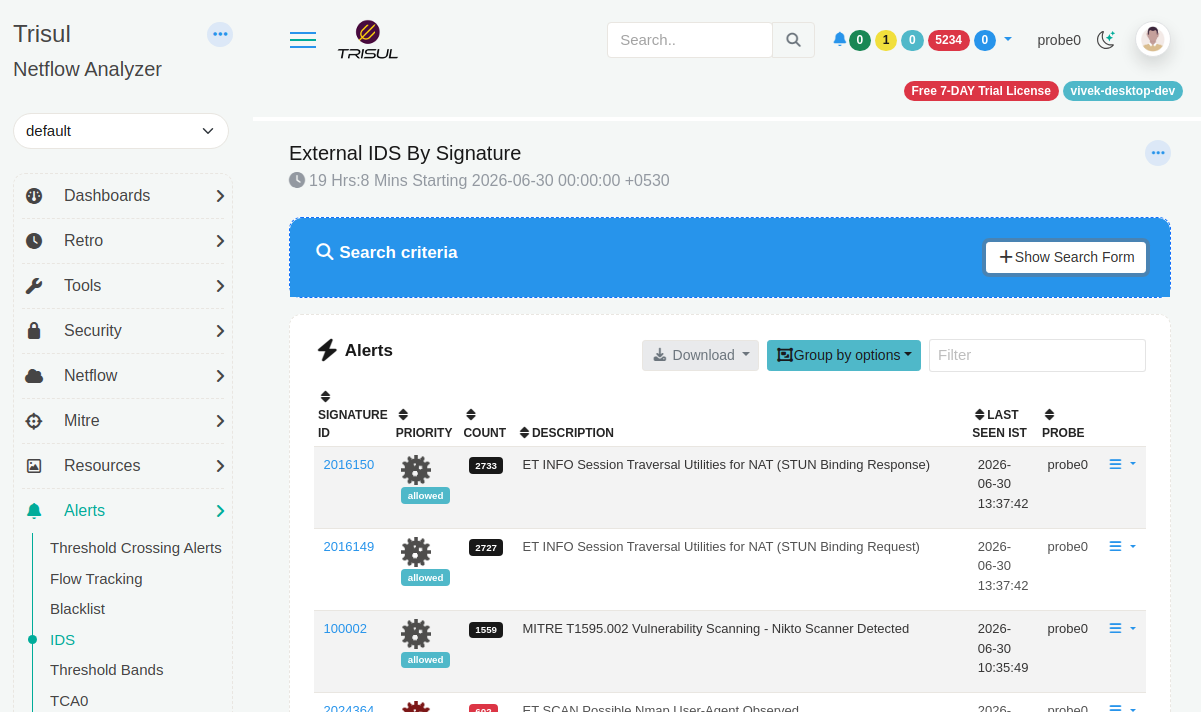 Example of noisy false positives. Note down the signatures
Note down the signature ID (sid) in the above screenshot 2016150 for example.
2. Disable the signature using disable.conf
Edit (or create) the disable file:
sudo vi /etc/suricata/disable.conf
Add the offending sid (one per line):
# Suppressing noisy signature - internal scanner alerts
2019401
You can also disable by regex match on the signature message if several related sids need to go at once:
re:internal-scanner-detected
3. Apply the change
Re-run suricata-update so it regenerates the active ruleset with the disabled
signature excluded:
sudo suricata-update
sudo systemctl restart suricata
Verify the signature is gone from the compiled ruleset:
grep "2019401" /var/lib/suricata/rules/suricata.rules
This should return nothing (or show the rule commented out, depending on your Suricata version's convention).
4. Confirm in Trisul
After this signature is suppressed navigate back to Alerts > IDS Alerts and sort/filter, the false positive will not be fired.