Configuring Primary Backup DR Systems
This document describes how you can setup a backup Trisul Network Analytics system as a DR (Disaster Recovery) node.
Terminology : In some places , we use DR node to refer to the Backup node, and DC node to refer to the Primary node. DC stands for Data Center.
Prerequisites
If you are configuring Disaster Recovery for a pre-existing Trisul install, ensure you copy the data over manually using scp first. By default, the sync initially only copies the latest 7 days during initialization.
Per Context DR
The Primary-Backup configuration needs to be configured on a per-context basis. The instructions on this page applies to the default context. Multi tenant customers with multiple contexts need to configure for each context separately.
Service Names
The systemd service names are
trisul-hub-replicator
Run on the PRIMARY (DC) node. Sets up the incremental replication processes from the primary. For contexts other than the default context this service is called trisul-hub-replicator-contextname
trisul-hub-primary-health-check
Runs on the BACKUP (DR) node. Checks the PING reachability of PRIMARY nodes. For contexts other than the default context this service is called trisul-hub-primary-health-check-contextname
Configuring DR on Primary and Backup Sites
Create Home Directories for the Trisul User
On both the Primary and Backup sites , Trisul processes run under the username trisul.trisul. This will be used by the replication process to synchronize the data.
Repeat the following process on both the primary and backup site.
Edit /etc/passwd
By default, the trisul user can't log in. Replication runs as trisul, so enable login for this user: assign it a shell as shown below. You then log in as trisul to sync the data.
trisul:x:999:999:Trisul Daemon User:/home/trisul:/bin/bash
Ensure home directory exists for the trisul user
root@ubuntuDR:~# mkhomedir_helper trisul
Create a password
root@Ubuntu:~# passwd trisul
Enter new UNIX password:
Retype new UNIX password:
passwd: password updated successfully
Create a SSH Key Pair for Automatic SSH
Do these for both PRIMARY-BACKUP and BACKUP-PRIMARY directions.
Use ssh-keygen
Login as the trisul user and use ssh-keygen to create a key pair. Press ENTER to skip the passphrase.
su trisul

trisul@Ubuntu:~$ ssh-keygen
Generating public/private rsa key pair.
Enter file in which to save the key (/home/trisul/.ssh/id_rsa):

skip the passphrase
..
Use ssh-copy-id to Setup Login
Use ssh-copy-id to create an automatic login for the trisul user. This will be used by rsync to transfer data to the backupsite.
On Primary :
ssh-copy-id trisul@backup-ip-address
On Backup :
ssh-copy-id trisul@primary
At this point , both sides should be able to login to each other without a password.
Configure the Primary Site Replication
On the primary site run the install-replication-primary.sh script to create the replication service.
root@Ubuntu:/usr/local/share/trisul-hub# ./install-replication-primary.sh
Configuring this node as a PRIMARY site in a PRIMARY-BACKUP (DR-DC) configuration

You will be asked a series of questions. Hit ENTER to accept defaults

Enter username   (default trisul) :
Enter domain    (default domain0) :
Enter hub          (default hub0) :
Enter context  (default context0) :
Enter IP of BACKUP site hub       : 192.168.2.141
Thanks ! Configuring scripts for replication, now testing connection
--------------------------------------------------------------------
PING 192.168.2.141 (192.168.2.141) 56(84) bytes of data.
64 bytes from 192.168.2.141: icmp_seq=1 ttl=64 time=0.197 ms

--- 192.168.2.141 ping statistics ---
1 packets transmitted, 1 received, 0% packet loss, time 0ms
rtt min/avg/max/mdev = 0.197/0.197/0.197/0.000 ms

  * Creating configuration file /usr/local/etc/trisul-hub/domain0/hub0/context0/DCDRReplicationSettings.conf
  * Checking rsync user home directory for RSYNC
  * Installing systemd services into trisul-hub-replicator.service
  * systemctl daemon-reload
  * Use [systemctl enable trisul-hub-replicator] to enable on reboot
  * Login as trisul on this site and run [ssh-copy-id trisul@192.168.2.141]  to create automatic login for RSYNC
  * Customize in config file /usr/local/etc/trisul-hub/domain0/hub0/context0/DCDRReplicationSettings.conf
Further Customization of PRIMARY Replication
Further customization can be done by editing the DCDRReplicationSettings.conf file shown above.
Configure the Backup Node Health Check
The backup node service performs a health check on pre-defined IP addresses in the primary site. If ALL the IPs are unreachable for a predefined period of time [default 7 minutes], the service declares the PRIMARY site to be down. Then starts the Trisul Probe Processes on the backup site and the service stops.
Use install-replication-backup.sh to configure the backup node.
root@ubuntuDR:/usr/local/share/trisul-hub# ./install-replication-backup.sh
Configuring this node as a BACKUP site in a PRIMARY-BACKUP (DR-DC) configuration

You will be asked a series of questions. Hit ENTER to accept defaults

Enter username       (default trisul) :
Enter domain        (default domain0) :
Enter hub              (default hub0) :
Enter context      (default context0) :
IPs for health check (space separated): 192.168.2.140
Enter IP of paired  PRIMARY hub       : 192.168.2.140

  * Creating configuration file /usr/local/etc/trisul-hub/domain0/hub0/context0/DRDCHealthCheck.conf
  * Checking rsync user home directory for RSYNC
  * Installing systemd services into trisul-hub-primary-health-check.service
  * Use [systemctl enable trisul-hub-primary-health-check] to enable on reboot
  * Login as trisul on this site and run [ssh-copy-id trisul@]  for restore sync
  * You can adjust timeouts , retries, advanced RSYNC options in the config file below
  * Customize in config file /usr/local/etc/trisul-hub/domain0/hub0/context0/DRDCHealthCheck.conf
Further Customization of the BACKUP Health Check
Further customization can be done by editing the DRDCHealthCheck.conf file shown above.
Start Services on Primary and Backup Nodes
On the PRIMARY node, the trisul-hub-replicator service pushes the incremental changes continuously to the backup site.
On the PRIMARY node
systemctl start trisul-hub-replicator
On the BACKUP node
systemctl start trisul-hub-primary-health-check
View Log Files About the Status of the Processes
on primary
journalctl -fu trisul-hub-replicator
on backup
journalctl -fu trisul-hub-primary-health-check
Optional: Check DR Status from the Primary
When the virtual IP points only to the DC, Trisul can't tell whether the DR node is running. To check it, set the DR Hub IP and port in Web Admin → Manage → App Settings → DR Settings on the DC node. You can then see from the traffic chart whether the DR node is running. This setting is optional and mainly for Trisul support. See DR Settings.
Failover
The Failover process is automatic.
When the PRIMARY site fails, the predefined IP addresses become unreachable from the backup site. The trisul-hub-primary-health-check service on the backup site starts the Trisul processes on the backup site and stops.
- Packet capture mode: Arrange for the packets to be sent to the backup system.
- NetFlow mode: Send the NetFlow streams to the backup probe addresses, for example with a load balancer.
Restoration
The restoration process needs manual intervention. First ensure that the conditions that caused the failure have been corrected.
The process is :
On PRIMARY: Bring Up the PRIMARY System
Boot the primary system and make sure it is working. Log in to it and check that it is:
- able to PING the backup node
- able to SSH into the backup node
On PRIMARY: Stop Any Running Trisul Processes
Ensure all processes are stopped on the primary system
trisulctl_hub stop context all
On BACKUP: Copy the Data to the PRIMARY
Now we need to copy the data from the running backup system onto the primary. This will include all the data that was collected during the downtime of the primary.
This step can take some time as the delta is copied from the BACKUP back to the PRIMARY node. We recommend you use a screen session to run this.
# preferably use a screen session

cd /usr/local/share/trisul-hub

./restore_sync_dr_dc.sh /usr/local/etc/trisul-hub/domain0/hub0/context0/DRDCHealthCheck.conf
This will run for a while, copying all the changes back to the DC site.
when the copying finishes you will see a message like the following.
..
sent 37 bytes  received 12 bytes  32.67 bytes/sec
total size is 0  speedup is 0.00
BACKUP WEBTRISUL DB
--- Successfully Finished Sync ---
--- The PRIMARY/DC site data is now ---
--- synchronized with the BACKUP/DR site ---

--- Now you can stop the BACKUP/DR ---
--- and start the PRIMARY/DC site ---
Wed Sep 23 07:07:27 EDT 2020
root@ubuntuDR:/usr/local/share/trisul-hub#
On BACKUP: Stop the Probes
You can manually stop the probes on the backup node. You should not stop the hub nodes however. Run the following command to stop the default context on probe0.
trisulctl_hub stop context default@probe0
On BACKUP: Switch Back to BACKUP Mode
Run this to go back to BACKUP mode.
systemctl start trisul-hub-primary-health-check
On PRIMARY: Start the Processes
On the primary node start up the processes
Start the Hub control utility, then start the context at its prompt:
$ trisulctl_hub
trisul_hub(domain0)> start context default
On PRIMARY: Switch Back to PRIMARY Mode
This step will put the system back into PRIMARY-BACKUP configuration.
systemctl start trisul-hub-replicator
This completes the process.
To view the status of the Replicator and Health Check processes, login as Administrator to either the primary or backup node. To view the status of the default context, do :
Select Context: default → Admin Tasks → DC DR Status
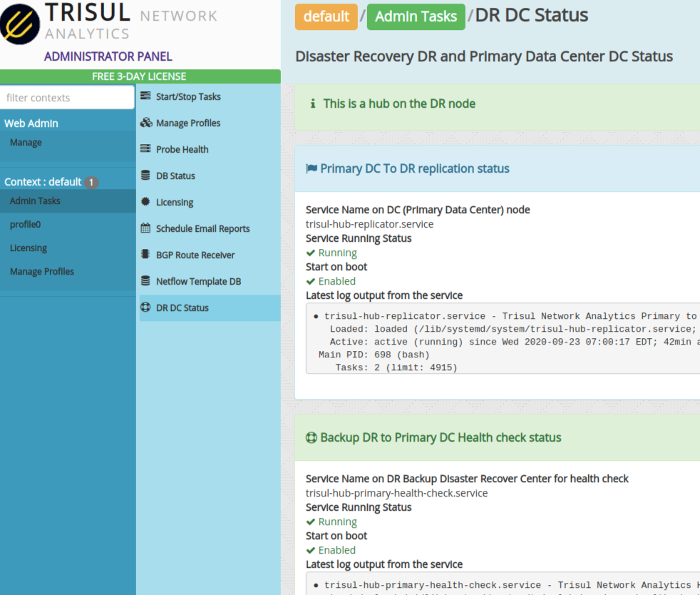
Figure: DC DR Status in Admin Tasks
The following information is shown:
| Field | Description |
|---|---|
| Mode | Whether the current node is configured as a PRIMARY (DC) or a BACKUP (DR) node |
| Replication status | Whether the replication process is running, enabled on boot |
| Replication log | Last few lines of the replication log, you can check the timestamps |
| Health check status | On the Backup (DR) node, whether the health check processes are active |
| Health check log | Last few lines of the health check process log |