View Meters
The View Meters page lists the measurements available for each Counter Group in Trisul. This page describes all the meters available out of the box in Trisul. Installing additional plugins will usually give you even more meters - which will be described in detail by the documentation accompanying each plugin.
A meter defines what Trisul measures for a counter group. For example, the Aggregates counter group includes meters such as Total, Packets, and Active Sessions.
You normally do not need this page for day-to-day traffic monitoring. Use it when you need to find out what measurements are available for a counter group, what each measurement means, and which units are used.
To open View Meters:
Goto Customize -> View Meters
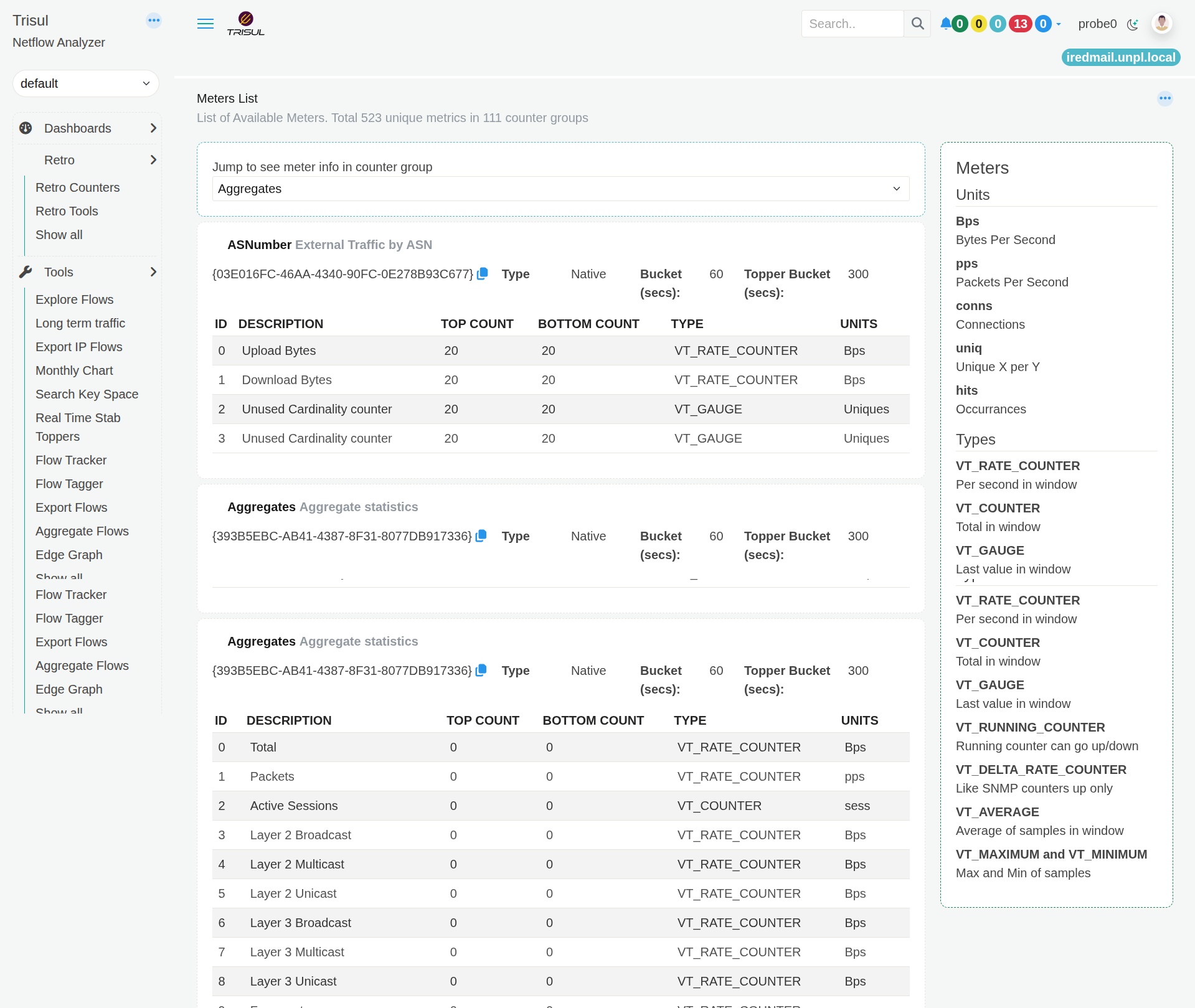
Figure: View Meters
Choose a Counter Group
The Jump to see meter info in counter group list lets you select a counter group and move directly to its meter information.
Each counter group represents a particular type of information that Trisul tracks. The selected counter group displays the measurements available for it.
For example, selecting Aggregates shows measurements such as Total, Packets, and Active Sessions.
Understand the meter information
Each counter group displays its available meters in a table.
| Column | Description |
|---|---|
| ID | Identifies the meter within the counter group. |
| Description | Describes what the meter measures. |
| Top Count | Shows how many top values can be tracked for the meter. |
| Bottom Count | Shows how many bottom values can be tracked for the meter. |
| Type | Shows how the meter value is calculated or stored. |
| Units | Shows the unit used for the measurement, such as Bps, pps, conns, or hits. |
When would I use View Meters?
Use View Meters when you need to answer questions such as:
- What measurements are available for a particular counter group?
- What does a particular meter measure?
- Is the measurement a rate, count, or current value?
- What unit is used for the measurement?
- Which meters are available for a counter group before using it in another Trisul feature?
For example, if you need to work with the Hosts counter group and want to know whether Trisul provides a measurement for connections, you can select Hosts and check its meter list.
Special key SYS:GROUP_TOTALS
SYS:GROUP_TOTALS
Each counter group has a special key namedSYS:GROUP_TOTALSThis meter represents the cumulative total of all keys in a given time interval. You can use this instead of a key if you want the totals.
All counter groups
See Trisul Traffic Meters for the full list of counter groups, with a one-line description of each, or pick a group from the sidebar.