Badfellas Plugin
The Badfellas plugin checks your network traffic against millions of indicators to detect malicious activity.
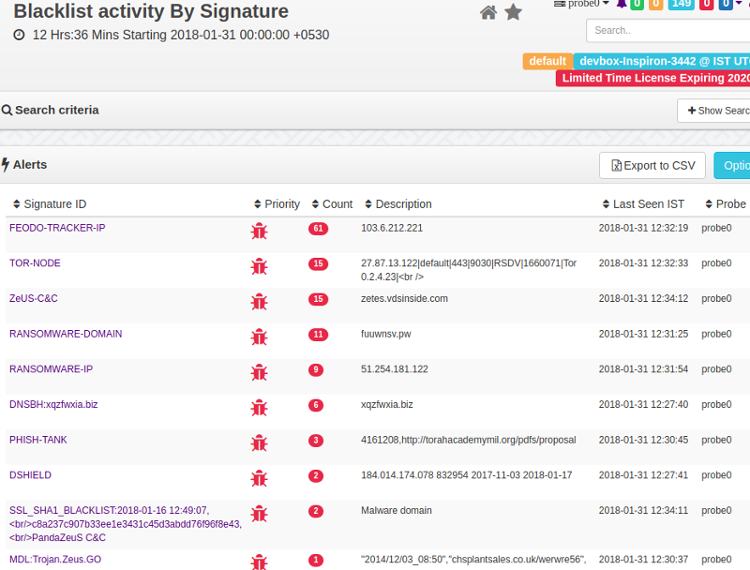
Figure: Blacklist Alerts
The following objects in your network traffic are scrutinized.
IP address
Matches IPs against blacklisted IPs
Domain
Matches blacklisted domain names, even if no response was received, or hidden in DNS records
HTTPHost
Checks if an HTTP host is blacklisted. Useful for flagging shared hosts like badun.blogspot.com
SSLHost
The Server Name Indicator (SNI) is inspected
URL Checks HTTP GETs/POSTs of your network against well known evil ones
SSLCertificate
Checks SHA1 fingerprint
Feeds
Feeds are sources of threat intelligence from which Trisul downloads updated threat indicators. Upon installation of badfellas plugin a “Feed” is automatically added to the Trisul-Hub node. The hub node then downloads the updates as per rules and pushes them to the probes.
The feed directory is located on the Trisul-Hub node at
cd /usr/local/var/lib/trisul-config/domain0/allcontexts/feeds
Inside this directory you can see feed_xx sub-directories representing plugins requesting feed updates. For example : GeoIP updates. The Badfellas feed is located in the subdirectory
cd feed-2F3CCCA3-38D4-4773-97AB-3ED732F82533
Inside the feed directory , there is a file called rules.xml This contains the feed configuration.
Removing a Feed
Locate the rules.xml file as described above. Then remove the feeds you want to disable. For example if you wish to disable the ALIENVAULT feed.
Remove the following lines
<Source>
    <URL>http://reputation.alienvault.com/reputation.generic.gz</URL>
    <Target>reputation.generic.gz</Target>
</Source>
The feed will be skipped at the next download. See Frequency parameter in the rules.xml file.
Included Blacklist Feeds
The Badfellas package installs stub copies of the following blacklists. These feeds are updated to the latest versions at the next scheduled update time. Within 24 hrs.
| Feed file | Source | Contents |
|---|---|---|
dns-blackhole.txt | malwaredomains.lehigh.edu | Domains known to spread malware and spyware |
dshield.txt | DShield.org | Malicious and scanner IPs |
feodotracker-ips.txt | Feodo Tracker | IPv4 addresses used as command-and-control servers by the Feodo Trojan |
phish-tank.txt | PhishTank | User-submitted phishing domains |
reputation.generic | AlienVault IP Reputation | IPs with a poor reputation, including scanners |
sslblacklist.csv | SSLBL | SHA1 fingerprints of malicious SSL certificates |
tornodes.txt | TOR node list | TOR nodes, to flag hosts that use TOR |
urlhaus-active.csv | URLhaus | Active malware distribution URLs |
Feed Updates
The plugin will automatically download a fresh database at a set schedule. You can control when and how frequently this database is updated by modifying the Frequency parameter in the rules.xml file. The default setting is 1 update every day. All feeds are updated at the same frequency.
<Run>
    <RunAt>0200</RunAt>
    <Frequency>86400</Frequency>
</Run>
Viewing Status of Feed Updates
To view the status of feed updates, whether the downloads were successful or not.
👉 Log in as admin, then select Web Admin → Manage → Plugin Data Updates
This shows the feed status.
Installation
This plugin is distributed as an RPM package and a DEB package. The file names include the version number, which changes with each release. The commands below use version 8.1.3011 as an example.
# on RHEL / Oracle Linux 8
rpm -Uvh trisul-badfellas-8.1.3011-1.el8.x86_64.rpm
# on Ubuntu 26.04
dpkg -i trisul-badfellas_8.1.3011-resolute_amd64.deb
Upgrading
Uninstall the old package and install the new package.
A Sample Install
When you install you should get an output like the following.
[root@localhost share]# rpm -Uvh trisul_badfellas-1.0.153-0.el5.x86_64.rpm
Preparing...                ########################################### [100%]
   1:trisul_badfellas       ########################################### [100%]
Creating temp staging area..
Creating consolidated Bad Fellas Tokyo Cab ..
Processing File /tmp/temp_trisul_badfellas_staging/usr/local/share/BadFellas/dns-blackhole.txt..25270 entries
Processing File /tmp/temp_trisul_badfellas_staging/usr/local/share/BadFellas/malware-domain-list.txt.......134498 entries
[root@localhost share]#
Uninstallation
Stop Trisul and uninstall the RPM/DEB
# on RHEL / Oracle Linux
rpm -e trisul-badfellas
# on Ubuntu
dpkg -r trisul-badfellas
Starting
The plugin takes effect after you restart the context: run trisulctl_probe restart context <context_name>@<probe_name>, or stop and start the Probe from Context: default → Admin Tasks → Start/Stop Tasks.
Adding Custom Indicators
Step 1: Create a tab-separated indicator file
Using external mechanism place your custom feed in a Tab Separated file with the following format <FEEDNAME><TAB><IP/DOMAIN/URL><TAB><DESCRIPTION>
Step 2: Add your file as a source feed for Badfellas automatic updates
Locate the feed rules.xml file as described in feeds
Find the local feed section
<!-- ***************************************************************** -->
<!--    Local feed                                                     -->
<!--     Any file named badfellas-local-*.tsv  will be processed       -->
<!--     The file is a TAB separated file with the following fields    -->
<!--     INTELSOURCE<TAB>KEY<TAB><DESCRIPTION>                         -->
<!--     KEY = IP Address, Domain Name, URL                            -->
<!-- ***************************************************************** -->
<Source>
    <URL>file:///usr/local/share/trisul/plugins/badfellas-local.tsv</URL>
    <Target>badfellas-local-0.tsv</Target>
</Source>
In the above snippet – the URL file://.... badfellas-local.tsv represents the source feed. Change it to your file or URL if you are hosting it on a website. The feed will be automatically refreshed like the other sources.
Restart Trisul or wait for about 30 minutes for the feed to be picked up
Configuration Parameters
The rules.xml allows you to customize
ReloadListSeconds
How frequently Trisul server reloads the threat intel information. This is separate from the per-feed download Frequency
CheckICMP
Scan ICMP traffic like PINGs for connection attempts
CheckDNS
Parse DNS records
CheckHTTPHost
Check HTTP Host header in addition to DNS
CheckTCPFlows
Check each flow
CheckURL
Check all URLs seen
FatTailRank
In the Top-1 million URL list, URLs ranked below this value are treated as the fat tail. The parameter is still supported, but you don't need to set it.
Locate the rules.xml file
<TrisulPluginConfiguration>
        <description>Controls how the Trisul Badfellas plugin works </description>
        <ReloadListSeconds>900</ReloadListSeconds>
        <CheckICMP>TRUE</CheckICMP>
        <CheckDNS>TRUE</CheckDNS>
        <CheckHTTPHost>TRUE</CheckHTTPHost>
        <CheckTCPFlows>TRUE</CheckTCPFlows>
        <CheckURL>TRUE</CheckURL>
Also Read
See the Badfellas Malware alerts section in the User Guide