OTT Analytics
Some ISP need visibility into OTT (Over the Top) media platforms such as Netflix, Prime, Disney, Hotstar, Zee5, Jio and also non OTT apps like YouTube, Whatsapp, Instagram. With the AS Analysis you can get visibility upto Google but into split into Google and YouTube.
It is an application monitoring to track popular apps on your network. Used for marketing optimization.
OTT Internet Apps
Install the OTT Analytics app and the Passive DNS Extractor app it depends on, plus the ISP OTT App Analytics dashboard app, from Web Admin → Manage → Apps. OTT Analytics works by integrating a real time DNS packet capture feed into the Trisul pipeline. The following diagram shows the integrations.
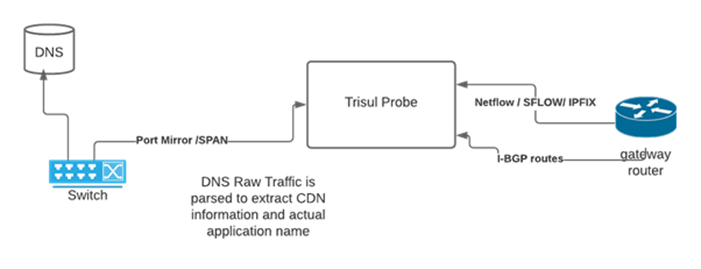
OTT diagram
This is combined with a fully customizable rules file (appmap.lua, inside the OTT Analytics app) that converts
domain names into applications. The built in rules file can identify
over 125 apps including YouTube, WhatsApp, Facebook Video, Instagram,
many OTT Platforms, local content like Jio Saavn, Zee5, SunTV, Microsoft
Office 365, Skype, cloud providers like Amazon, GCP, Azure, and so on.
The customer can tune the file on a rolling basis as new services are
seen. After you edit the file, restart the Probe so the change takes effect.
Connect the DNS feed
The DNS feed comes from a separate packet-capture context that collects DNS into its passive DNS database. Two scripts in /usr/local/share/trisul-probe copy that database into the NetFlow context:
- Run
setup-ott-dns.shonce. It creates/usr/local/share/trisul-probe/ott-dns.confwith the source (DNS capture) and destination (NetFlow) context names. - Add
sync-ott-dns.shto cron, hourly:
0 * * * * /usr/local/share/trisul-probe/sync-ott-dns.sh /usr/local/share/trisul-probe/ott-dns.conf
sync-ott-dns.sh stops the source context while it copies the database.
OTT App monitoring is available in two formats.
- For the entire network
- On a per interface basis
Log in as a user and go to Dashboards → Show all. Type OTT Internet Apps in the filter.
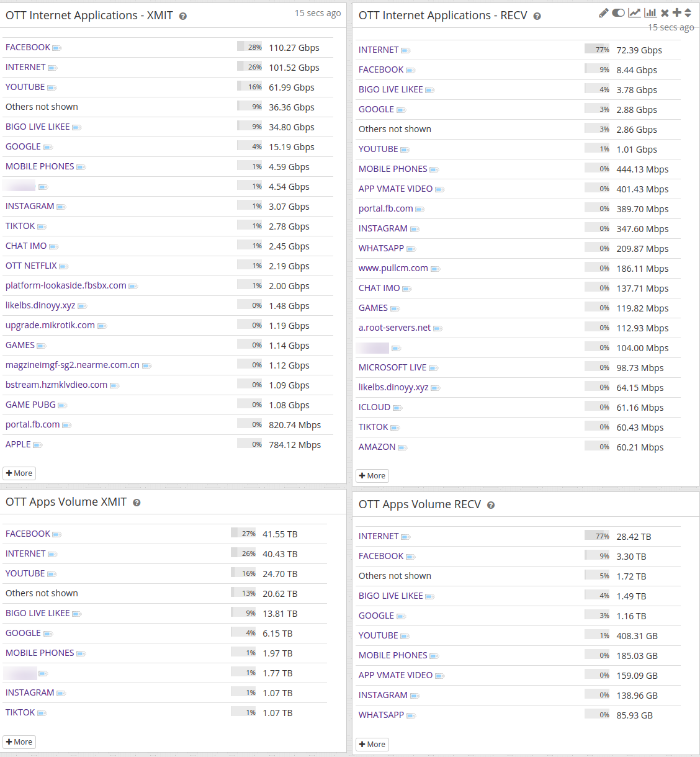
OTT dashboard