Backups
There are two categories of data you might want back up :
Configuration
This includes all the config files, analytics configuration, users, web
config, context configuration, and such.
Data
This includes the metrics, flows, alerts, packets
For a large data platform like Trisul , configuration backup is of main importance. The databases can grow to several terabytes. The recommended solution for full scale data backup is to setup a DR node.
Directories
For small deployments, back up the /usr/local directory. Ensure to first check the directory size using du -sh /usr/local
The following directories need to be backed up. If your Trisul installation is small, back up these directories with normal Linux backup tools.
| Directories | Description |
|---|---|
| /usr/local/share | data |
| /usr/local/lib | libraries |
| /usr/local/var | data and log files. This directory can be large |
| /usr/local/etc | config |
| /usr/local/bin | executables |
How to take Trisul Data Backup Manually
To ensure business continuity, it is essential to regularly back up Trisul data and configuration. Here's a step-by-step guide:
Trisul Data Backup
Stop the context before you copy the data, and start it again when the copy finishes:
$ trisulctl_hub
trisul_hub(domain0)> stop context default
...
trisul_hub(domain0)> start context default
Step 1: Load Trisul Environment Variables
source /usr/local/share/trisul-hub/trisbashrc
This command loads the Trisul environment variables.
Step 2: Navigate to the Trisul Data Directory
cd.m
This command changes the directory to the Trisul data path.
Step 3: Verify the Current Working Directory
pwd
This command prints the current working directory to verify that you are in the correct location.
Step 4: Backup Trisul Data and Configuration For example:
cp -r /usr/local/var/lib/trisul-hub/domain0/hub0/context0/meters <backup folder>
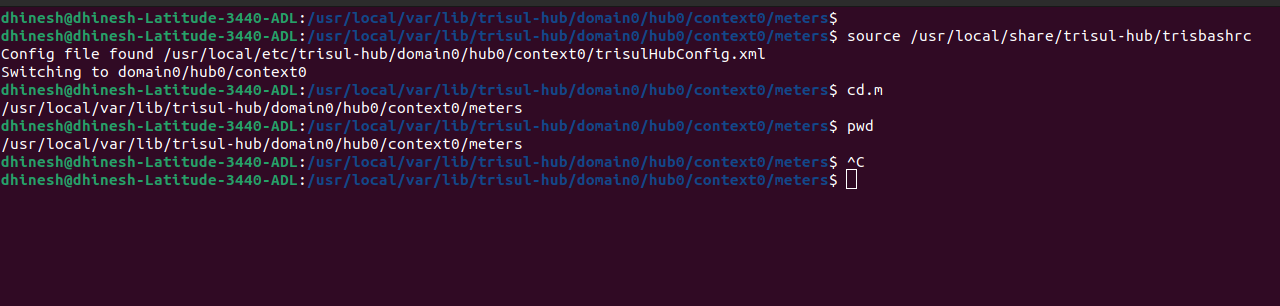
Figure: Showing Example of Trisul Data Backup
How to take Trisul Configuration Backup
Trisul Configuration Backup
Back up the following directories. A complete configuration backup needs both the Hub and the Probe directories.
| Config | Path | Description |
|---|---|---|
| Trisul Hub config | /usr/local/etc/trisul-hub/ | Hub configuration files |
| Trisul Hub data | /usr/local/share/trisul-hub/ | Hub data |
| Trisul Probe config | /usr/local/etc/trisul-probe/ | Probe configuration files |
| Trisul Probe data | /usr/local/share/trisul-probe/ | Probe data |
| WebTrisul config | /usr/local/var/lib/trisul-config/ | WebTrisul database (users, roles, dashboards, App Settings), licence files and profile configuration |
Running install_setup_backup.sh
For Secured Backups Using ssh/scp: You need to setup automatic login use
ssh-copy-id
The steps are :
- Go to /usr/local/share/trisul-hub
- Type ./install_setup_backup.sh
- You will be asked to enter the SFTP login details , or FTP login details
- You will be asked to enter a remote directory
Once completed, a crontab entry will be automatically created to backup at 4:00AM daily. You may adjust this later.
Backup Trisul Configuration
install_setup_backup.sh creates setup_backup.conf from the template install_setup_backup.conf and adds this crontab entry. The entry runs setup_backup.sh, the script that does the backup, with the settings in setup_backup.conf:
0 4 * * * /usr/local/share/trisul-hub/setup_backup.sh /usr/local/share/trisul-hub/setup_backup.conf
To take a one-time backup now, run setup_backup.sh directly:
/usr/local/share/trisul-hub/setup_backup.sh /usr/local/share/trisul-hub/setup_backup.conf
The backups are placed in the remote directory in a single tar.gz file with the HOSTNAME and TIMESTAMP of the backup
Distributed Probe
If you have a distributed setup, copy the install_setup_backup.sh
install_setup_backup.conf and setup_backup.sh files to each node
into the /usr/local/share/trisul-probe or trisul-hub directories and
repeat the above steps.
Restoring Trisul Data
To restore the backup. Locate the backup with the correct timestamp you wish to use and untar the backup file.
Stop the context before you restore the data, and start it again when the copy finishes:
$ trisulctl_hub
trisul_hub(domain0)> stop context default
...
trisul_hub(domain0)> start context default
Step 1: Load Trisul Environment Variables
source /usr/local/share/trisul-hub/trisbashrc
This command loads the Trisul environment variables.
Step 2: Navigate to the Trisul Data Directory
cd.m
This command changes the directory to the Trisul data path.
Step 3: Verify the Current Working Directory
pwd
This command prints the current working directory to verify that you are in the correct location.
Step 4: Restore Trisul Data
For example:
cp -r <backup folder> /usr/local/var/lib/trisul-hub/domain0/hub0/context0/meters