Traffic Metering Concepts
This section attempts to briefly explain the basic concepts of counter groups, meters, and keys.
Counters, Meters, and Keys
Counter Group
A counter group is a category of things Trisul measures, such as Hosts, Applications, MACs, Subnets or VLANs. Think of each counter group as a notebook:
- Counter group (the notebook) = for example, Hosts
- Key (a page in the notebook) = one item in the group, for example the host 10.10.255.7
- Meter (a line on the page) = one measurement for that item, for example transmit bytes
There are a number of Built-in counter groups that ship with Trisul. You can also create your own custom counter groups. Trisul measures 12+ counter groups that contain multiple counters to track various aspects of network traffic.
A Meter
A Meter is the measurement of a single counter that measures a specific aspect of network traffic, such as upload bytes, number of packets, or number of connections. In the notebook analogy, a meter is one line on a page, such as the transmit bytes for one host.
Trisul collects info about Total Bytes, Packets, Receive, Transmit, Number of active connections, Alerts and 10 other items. Each of these is called a meter. The Hosts counter group tracks 13 meters (stat IDs 0–12, listed below).
A Key
A Key is a unique identifier for one item within a counter group. In the notebook analogy, it is one page.
For example, within the Host counters group, the IP Address 10.10.255.7 is a key. A
counter group can have millions of keys.
A Picture
The following example illustrates the concept of
-
Counter Groups
-
Keys
-
Meters
As an example, if we wanted to refer to “Transmit traffic of host 192.168.1.2” :
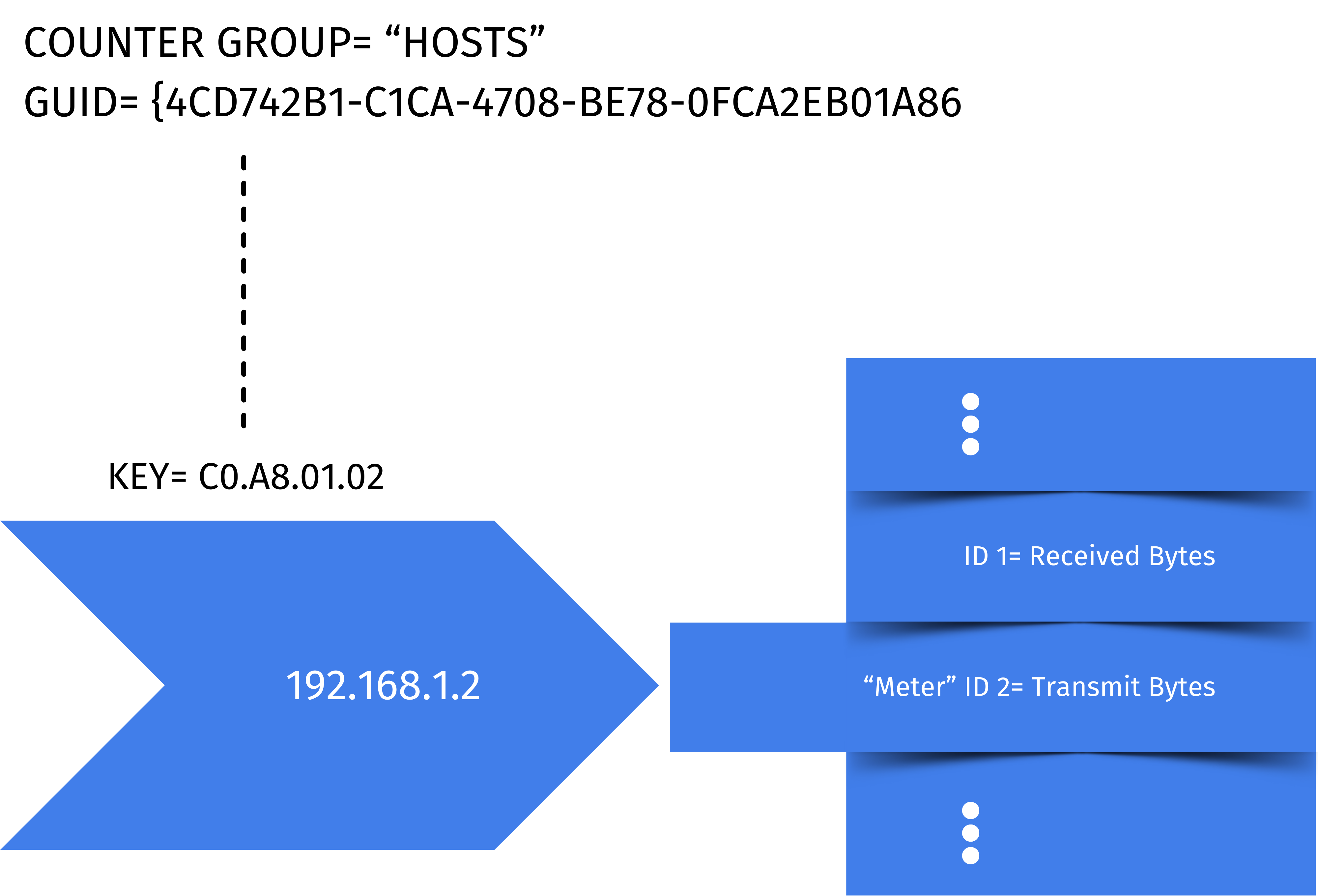
Figure: Showing Transmit traffic to Demonstrate Counter Group, Key and Meter
The entities of interest are
| Entity | Description | Example as in diagram |
|---|---|---|
| Counter Group | The Hosts counter group | {4CD742B1-xxx} identifies the host counter group. |
| Key | The individual host within the counter group, also known as a Key | C0.A8.01.02 identifies the host with IP 192.168.1.2 |
| Meter | The statistic | 2 identifies Transmit Bytes in Bytes/Sec. The Hosts counter group tracks 13 meters |
Statistics Tracked for Each Group
Trisul meters the same set of statistics for each of these keys. Each meter, known as stat-id, represents a statistic of interest over time. The meters available depend on the counter group.
For each Key (counter group item), Trisul tracks and stores :
-
Values of several meters for each Key over time.
-
Top-N keys for selected meters.
-
Aggregate meter values of all keys.
Example: The Hosts counter group tracks the following meters (stat-ids).
| Stat ID | Represents | Type | Toppers Tracked |
|---|---|---|---|
| 0 | Total Traffic | Bps | 50 |
| 1 | Received | Bps | 10 |
| 2 | Transmit | Bps | 10 |
| 3 | Packets | pps | 0 |
| 4 | Active TCP Conns | conns | 0 |
| 5 | Attacker alerts alerts originating from this host | count | 10 |
| 6 | Homenet Total traffic for hosts is in home network | Bps | 20 |
| 7 | External Total traffic for hosts is not in home network | Bps | 20 |
| 8 | TCP SYN sent | packets | 10 |
| 9 | TCP SYN recv | packets | 10 |
| 10 | TCP SYNACK sent | packets | 0 |
| 11 | TCP RSTFIN sent | packets | 0 |
| 12 | Victim alerts alerts targeting this host | alerts | 10 |
Click on any counter group to see what meters are available. You can also edit the number of toppers tracked
Data Resolution
There are two parameters of importance.
-
Bucket Size
-
Topper Bucket Size
| Parameters | Default value | Description |
|---|---|---|
| Bucket Size | Default 30 seconds | Traffic data is bucketized (averaged) over this many seconds |
| Topper Bucket Size | Default 300 secs (5 minutes) | For those stat-ids for which we are tracking toppers, the toppers are stored every this many seconds |
You can adjust both these parameters for each counter group via the web interface.
Storing Topper Traffic only
Some counter groups have extremely high key diversity, such as the counter group “Hosts” an ISP. This represents all internet sites browsed by all customers. In such an environment, you may only want to store detailed statistics of say the top 5000 IPs. This can help reduce disk space requirements yet give you sufficient coverage.
You can set any counter group to only save meters for the top keys via the web interface
A key which makes any of the topper lists (eg, Top TCP SYNS, Top Received, etc) will be considered a topper for this option.
Types
Counter groups fall into two categories
Built in
Basic metering primitives provided by Trisul. This is backed by C code
that uses the Trisul API.
User defined
Customized metering derived from the built-in counter groups. You get to
create the statistics that make sense for your business.
Built-in
Trisul ships with a set of built-in counter groups. These provide primitive statistics which you can build upon to create more complex counter groups. Built-in counter groups are backed by C code in the core Trisul software.
User Defined
You can build upon the primitive counter groups to create advanced custom counters for your business needs.
Combine Hosts and Applications to create a counter group that only counts Hosts talking HTTP protocol.