SSL/TLS Metering
Packet capture mode only.
Three counter groups give you visibility into the SSL encrypted traffic in your network.
- TLS Orgs - Organizations that issue TLS certificates, which verify the identity of entities (websites, servers, etc.) and establish secure connections over the internet. Examples: GlobalSign, DigiCert, etc. Trisul meters this traffic by the issuing organization.
- TLS Ciphers - A set of algorithms used to secure data transmitted over the internet. Example: encryption algorithm like AES, DES, authentication algorithms like SHA, MD5, and key exchange algorithms like RSA, ECDH. Trisul captures these traffic by encryption and key exchange algorithms.
- TLS CAs - Similar to TLS Orgs, Trisul meters this traffic by certificate authority. Examples: DigiCert, Let's Encrypt, Sectigo.
Trisul detects usage of SSL/TLS using port independent heuristics.
Trisul handles SSL/TLS session resume.
TLS Orgs
TLS Orgs meters traffic by the organization that issued the X.509 certificate (the digital certificate used to verify the identity of a website or organization). This counter group tells you how much of your SSL traffic uses certificates from each issuing organization. This visibility would otherwise be difficult to obtain.
👉 Select Retro →Retro Counters →Choose TLS Orgs from the dropdown list
TLS Counter Group Tabs
The TLS counter groups on retro counter will open the Counter group TLS Orgs/TLS Ciphers/TLS CAs toppers for each meter of the selected counter group in four tabs namely,
Topper Counts
By default it will open the Topper counts tab that will allow you to view the toppers for each meter of the counter group from top down (ascending order).
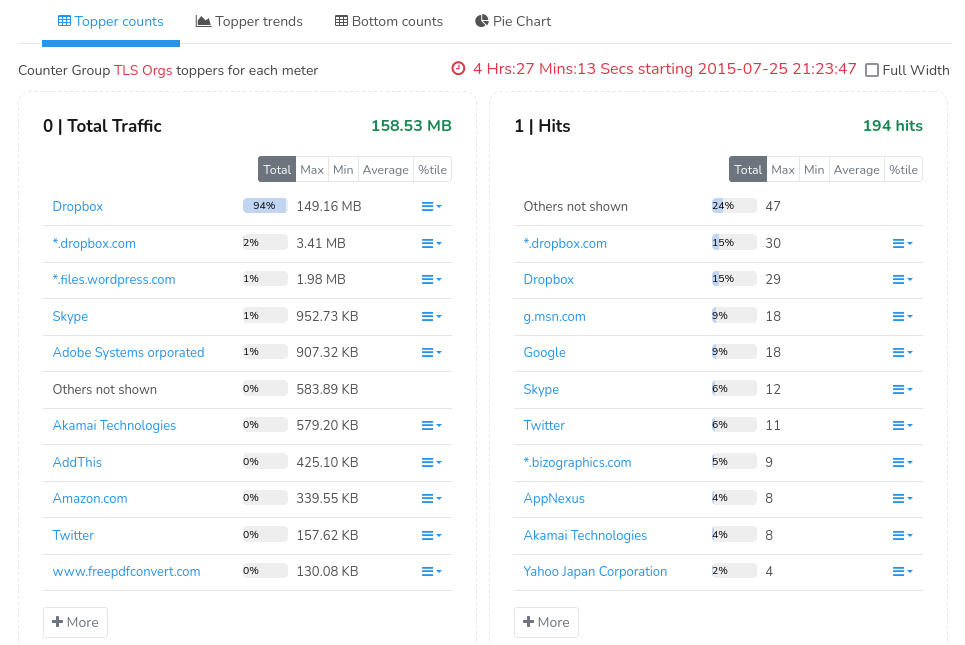
Figure: Meter 0 (Total Traffic) = Bytes per org, Meter 1 (Hits) = Number of SSL/TLS flows
Topper Trends
Click on the Topper trends tab on the same module and view the topper trends for total traffic.
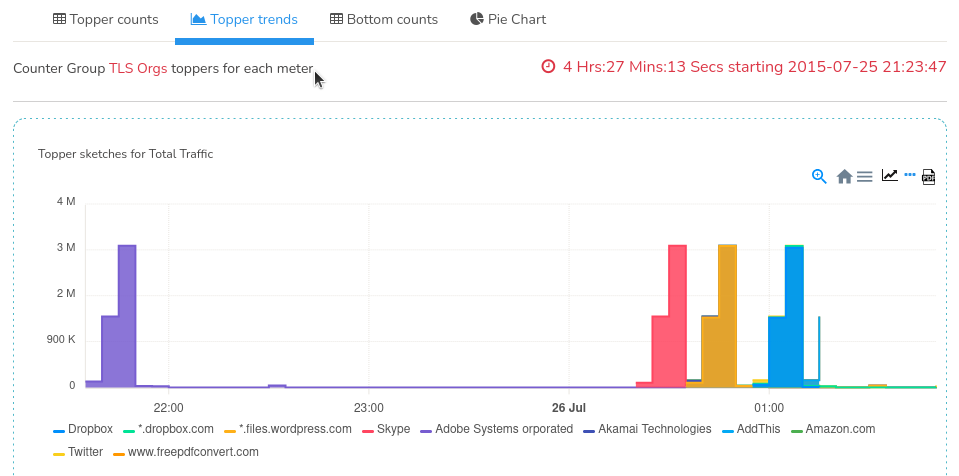
Figure: Topper Trends for Counter Group Toppers
Bottom Count
On the same module click on the Bottom count tab to view the toppers for each meter of the counter group from bottom up (descending order)
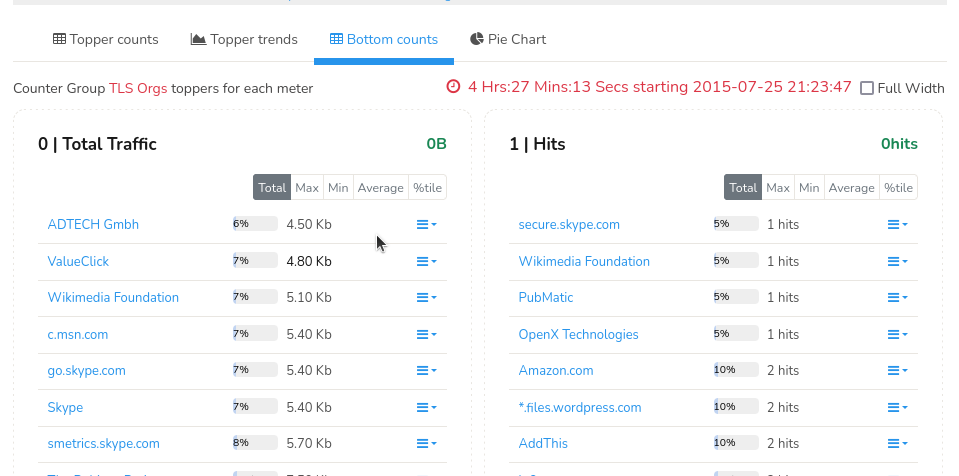
Figure: Bottom Count for Counter Group Toppers
Pie Chart
Click on the Pie chart tab on the same module or you can also generate long term usage reports with several charts like the pie chart shown below using Retro Tools.
👉 Select Retro →Retro Tools →Select Counter Group Toppers →Select TLS Orgs
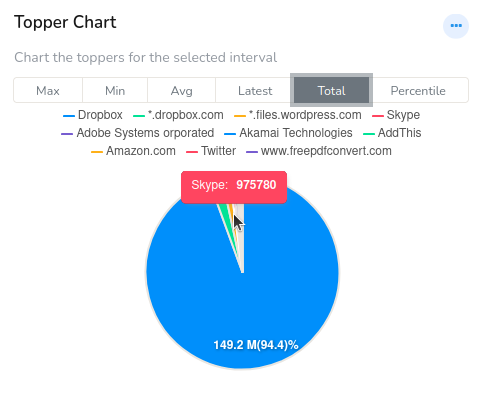
Figure: Pie Chart for Long Term Usage Report
TLS Ciphers
TLS Ciphers allows metering of traffic by the “cipher suite” used by SSL/TLS connections. The cipher suite is a combination of the encryption and the key-exchange algorithm used. Example:
-
TLS_RSA_WITH_AES_128_CBC_SHA
-
TLS_ECDHE_ECDSA_WITH_AES_256_GCM_SHA384
To open TLS Ciphers countergroup,
navigation👉 Select Retro →Retro Counters →Choose Ciphers from the dropdown list
This will open TLS counter group tabs for Counter Group TLS Ciphers for each meter.
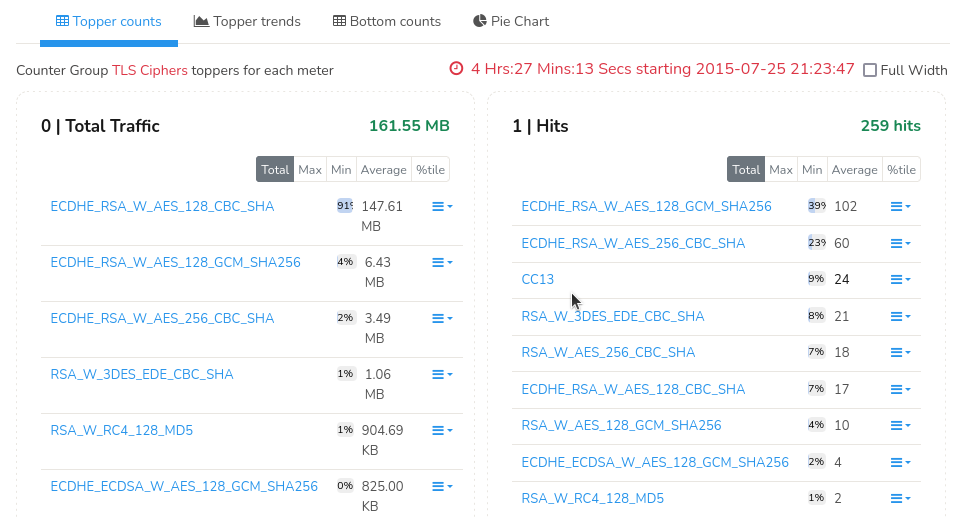
Figure: Meter 0 (Total Traffic) = Bytes per suite, Meter 1 (Hits) = SSL/TLS flows per suite
TLS Certificate Authorities
Trisul tracks the certificate chains of SSL/TLS connections. It takes the Issuer Common Name of each certificate in the chain and meters it in the following manner.
- Issuer CN for last cert in chain →Metered as Root CA
- Issuer CN for others →Metered as Intermediate CA
Usage Tip
This is optimized for long term queries, you can select a week or a month as look at any suspicious root or intermediate CAs.
To open the TLS CAs counter group,
👉 Select Retro →Retro Counters →Choose CAs from the dropdown list
This will open TLS counter group tabs for Counter Group TLS CAs for each meter.
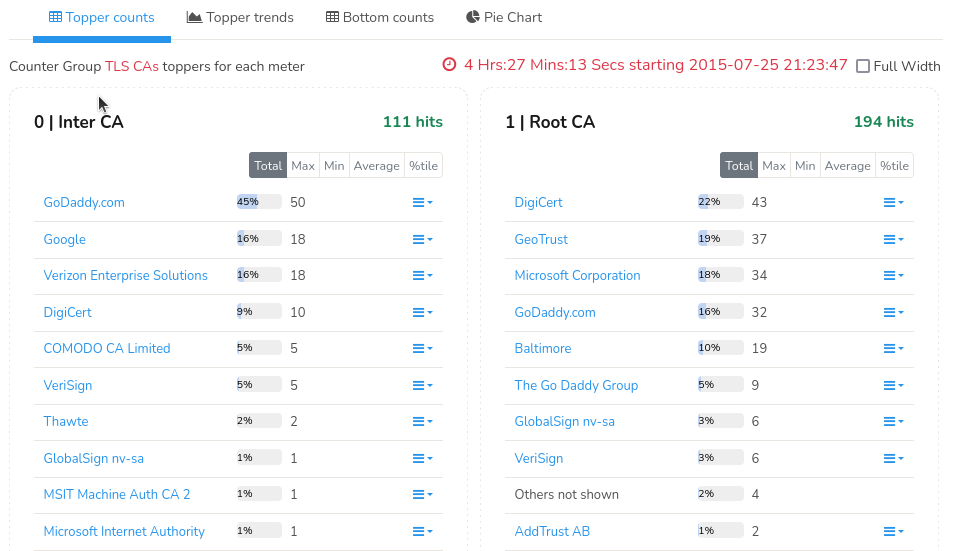
Figure: Meter 0 (Inter CA) = flows as intermediate CA, Meter 1 (Hits) = flows as root CA
TLS Root CAs
Displays the top TLS Root Certificate Authorities observed in encrypted traffic sessions.
| Field | Description |
|---|---|
| TLS Root CA | Name of the Root Certificate Authority observed in TLS sessions |
| Percentage | Percentage contribution of traffic or sessions associated with the Root CA |
| Traffic / Count | Volume or number of sessions associated with the Root CA |
| Expand Menu | Opens additional drilldown and traffic investigation options |
TLS Inter CAs
Displays the top Intermediate Certificate Authorities observed in TLS traffic.
| Field | Description |
|---|---|
| TLS Inter CA | Name of the Intermediate Certificate Authority |
| Percentage | Percentage contribution of sessions or traffic |
| Traffic / Count | Traffic volume or session count associated with the Intermediate CA |
| Expand Menu | Opens additional analysis and drilldown options |
Drilldown Menu Options
| Option | Description |
|---|---|
| Set/Edit Label | Assigns or modifies a label associated with the selected TLS CA entry |
| Traffic Chart | Displays bandwidth and traffic trends associated with the selected TLS CA |
| Long Term Traffic report | Generates long-duration historical traffic reports for the selected TLS CA activity |
| View Edge Graph | Displays communication relationships and connection paths associated with the selected TLS CA |
| Download PCAP | Downloads packet capture data related to the selected TLS traffic |
| SSL Resources | Displays SSL/TLS resources and metadata associated with the selected TLS CA |
| SSL Resources Full text search | Performs full-text search across SSL/TLS resource metadata |
| Query flows by tag | Searches flows associated with tags linked to the selected TLS traffic |
| Aggregate flows by tag | Aggregates and summarizes tagged TLS-related flows |
| Statistics | Displays statistical information related to the selected TLS CA traffic |
Usage Tips
- SSL Cert resources allow you to search for hashes in bulk
- SSL Cert FTS allow you to search for arbitrary strings in certificates